Kondory Technology - Studio Fácil
Skip to main content
Kondory: AI virtual assistant Online
0:00 Recording voice note…
Developed by Kondory Tecnología
¡Hola soy tu asistente virtual con I.A. !

Studio Fácil: Webcam Studio Software

A cloud platform to manage your webcam studio's models, schedules, revenue, payments and reports.

Overview

What is Studio Fácil?

Studio Fácil is a niche cloud software for managing webcam studios. It centralizes model records, shift and hours tracking, revenue tracking by platform, payment settlements (commissions, deductions and advances) and performance reports, with role-based access from any device.

See how it works
Real screenshot of the system, with sample data.

Solution sheet

Who it’s for
Webcam studios with on-site or remote models, at one or several locations.
Main modules
Models and contracts, shifts and attendance, payroll by tokens or in dollars, store with point of sale, cash closing and statistics.
Where it runs
In the cloud, with your own installation: your domain, your database and your logo.
User profiles
Administrator, monitor, model and store, with permissions per profile.
Implementation and support
Training with a fortnight of your studio and support by WhatsApp and email.
Plans
Essential, Professional and Business, quoted for your studio.
Fewer spreadsheets

Benefits of Studio Fácil

Tools designed for how a webcam studio operates.

  1. Automation

    Automate payment settlements, reports and schedule control, and cut manual work.

  2. Mobile access

    Check your studio's information from your phone, tablet or computer.

  3. Key indicators

    See revenue and performance by model in real time to decide with data.

  4. Protected information

    Differentiated roles and permissions, encrypted data and an activity log: each person sees only what concerns them.

How it works

What Studio Fácil looks like inside

The journey of a pay period, step by step: from a model joining to the payroll being paid.

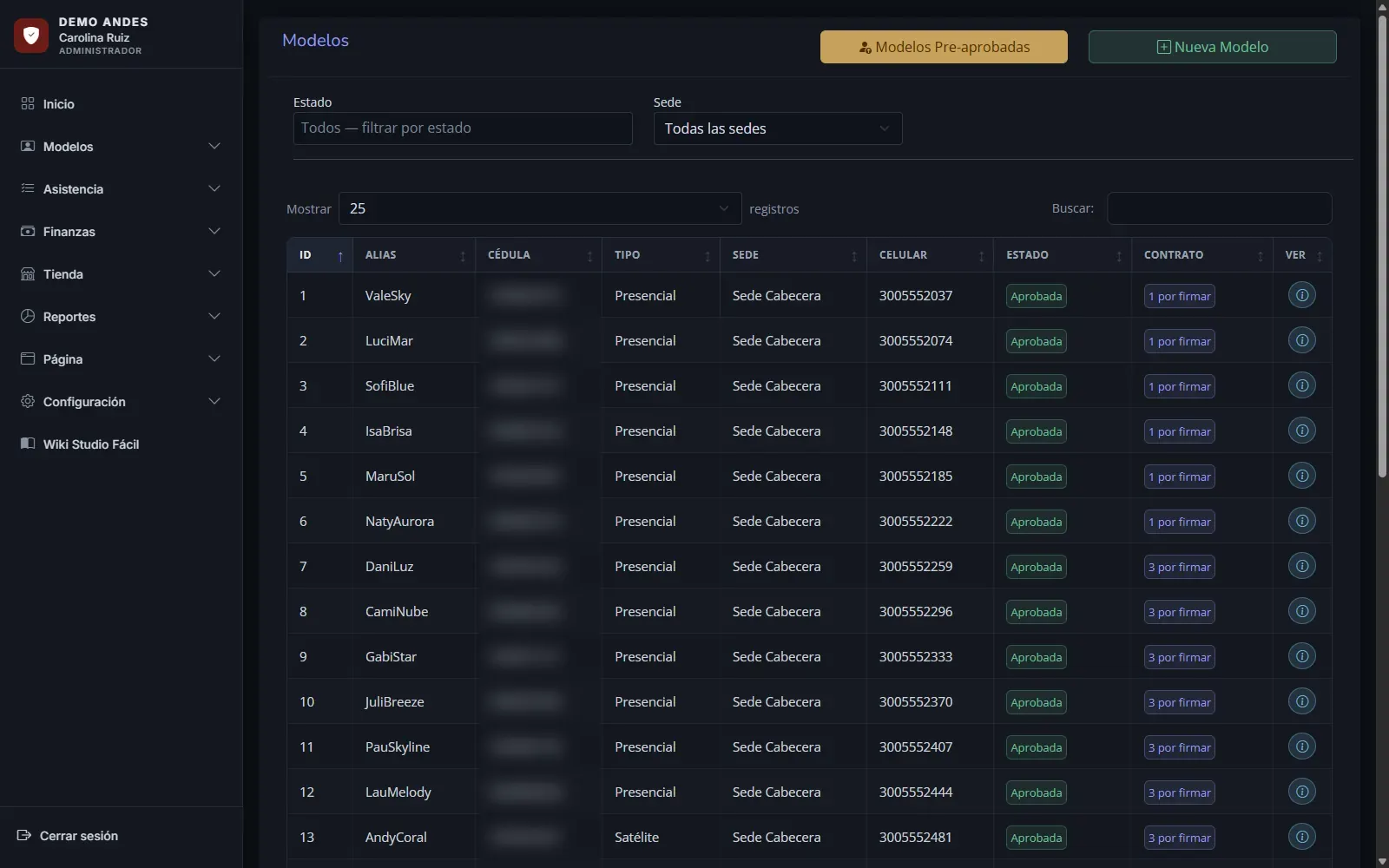
Webcam studio model list with location, on-site or remote type, approval status and contracts pending signature
Step 1 of 7 · Models

Every model with her profile, location and contracts

The list brings together models with their alias, type (on site or remote), location, status and the contracts still to be signed.

  • Filter by status and locationRegistered, pre-approved, approved, rejected or withdrawn, at each location.
  • Contracts to signYou know how many documents each model is missing, with PDF signature.
  • Onboarding processApplicant registration, interviews and a pre-approved list before onboarding.

Once the model is approved and her contract signed, she gets a shift and location and starts clocking in.
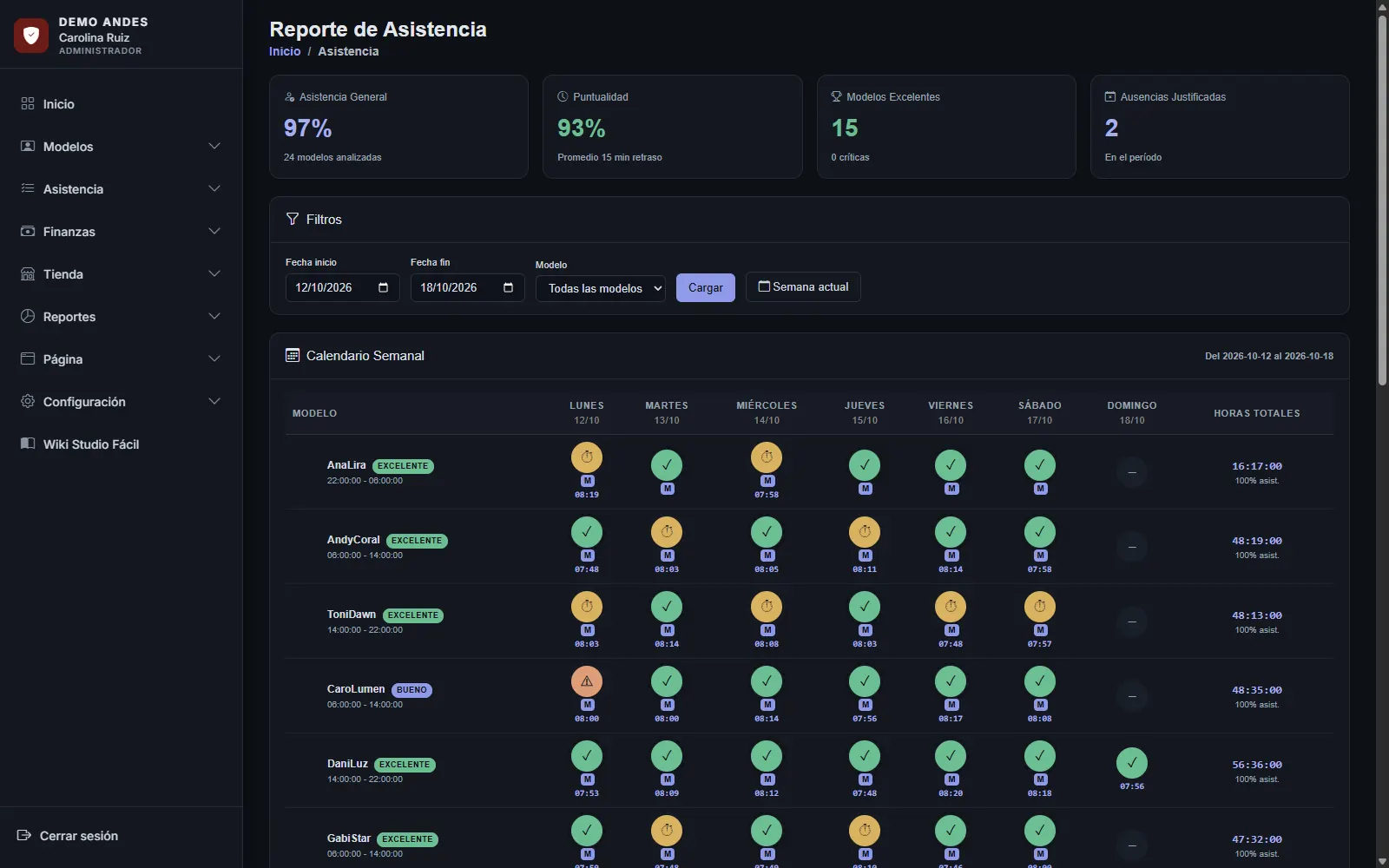
Weekly model attendance report with attendance and punctuality rates and a check-in calendar by shift
Step 2 of 7 · Attendance

Attendance and punctuality, week by week

The report shows overall attendance, punctuality and a calendar per model with each day’s check-in time and total hours.

  • Attendance indicatorsOverall attendance, punctuality with average delay and excused absences.
  • Calendar per modelEach day’s mark with check-in time, shift and hours worked.
  • Automatic finesOn time, slightly late, very late, absent or excused, with the fines that come from the sheet.

Hours, delays and fines from attendance go into the fortnight’s payroll.

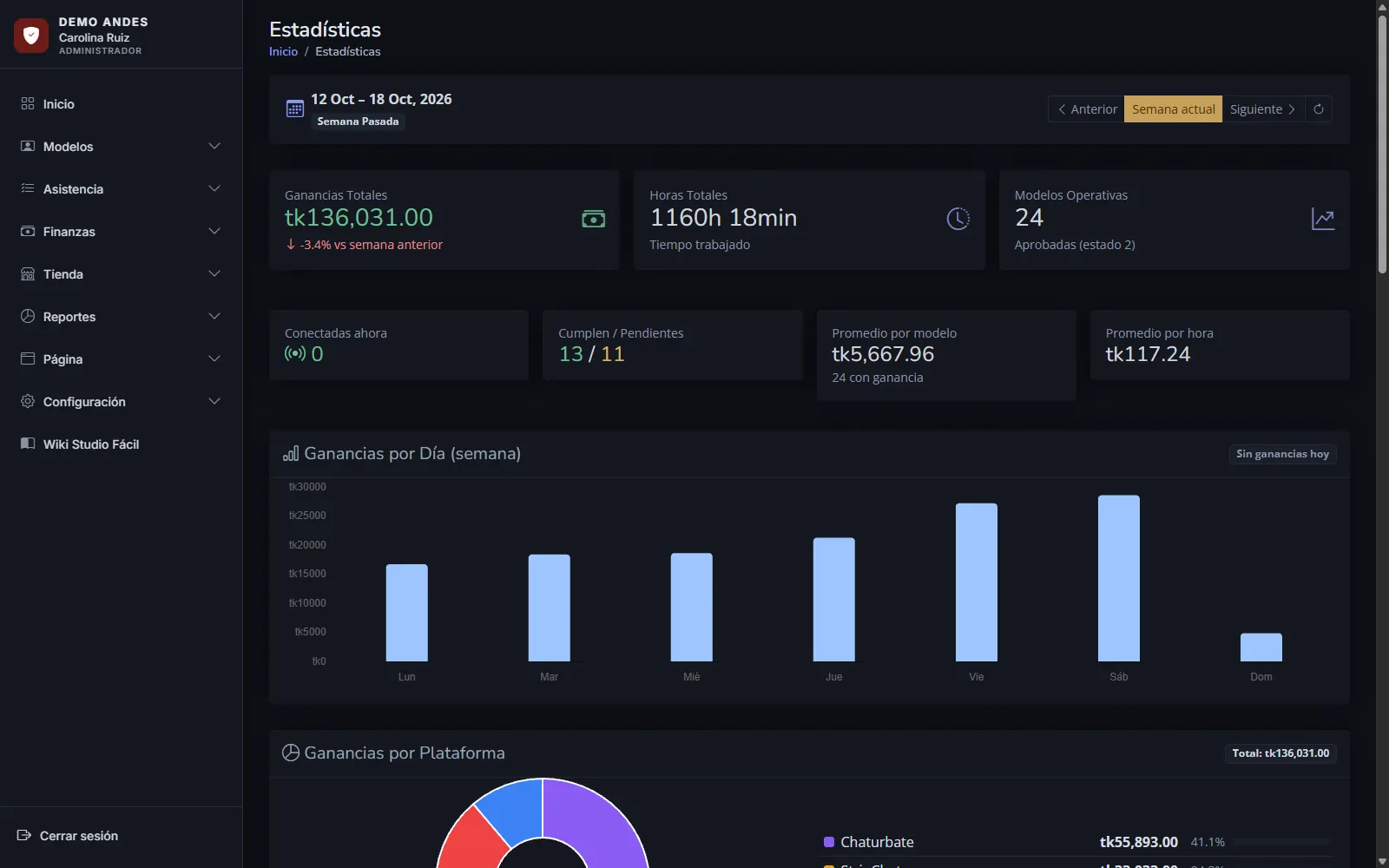
Weekly studio statistics with total earnings, hours worked, averages per model and per hour and earnings by day
Step 3 of 7 · Statistics

How the week compares with the last one

Total earnings, hours worked, active models and averages per model and per hour, with the change against the previous week.

  • Weekly comparisonThe percentage change and navigation between weeks.
  • By day and by platformCharts with the total and the share of each platform.
  • RankingsModels and monitors by earnings, downloadable as CSV.

Each model’s weekly tokens are the basis of her pay in the payroll.

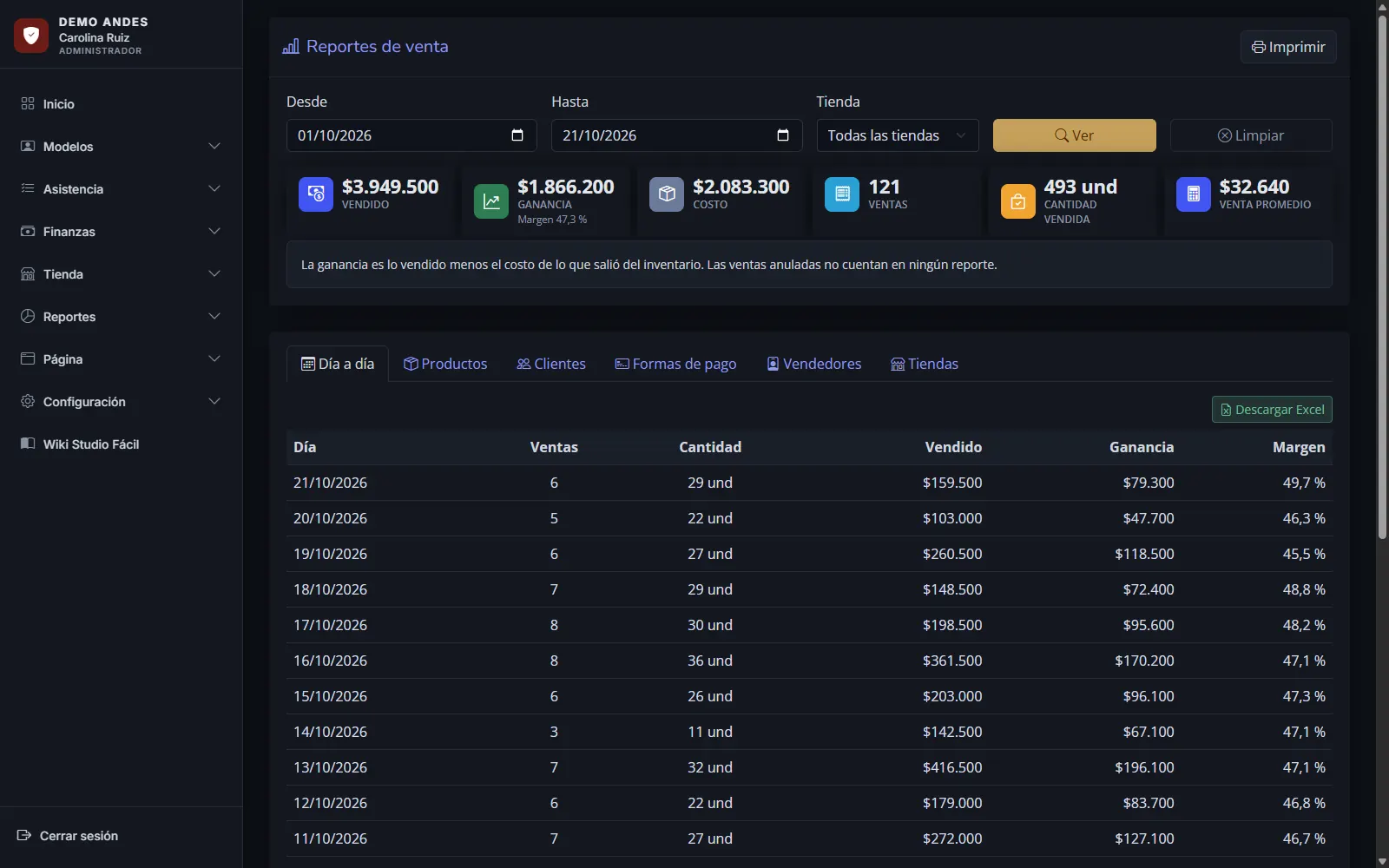
Sales report of the studio’s in-house store with total sales, profit, margin and day-by-day detail
Step 4 of 7 · Store

The studio store, with its real profit

Sales, profit and margin of the in-house store, day by day, by product, customer, payment method, seller or store.

  • Real profitSales minus inventory cost; voided sales do not count.
  • Six report viewsDay by day, products, customers, payment methods, sellers and stores.
  • Excel and printingFilter by dates and store, then download or print the report.

What a model buys at the store is automatically deducted from her payroll.

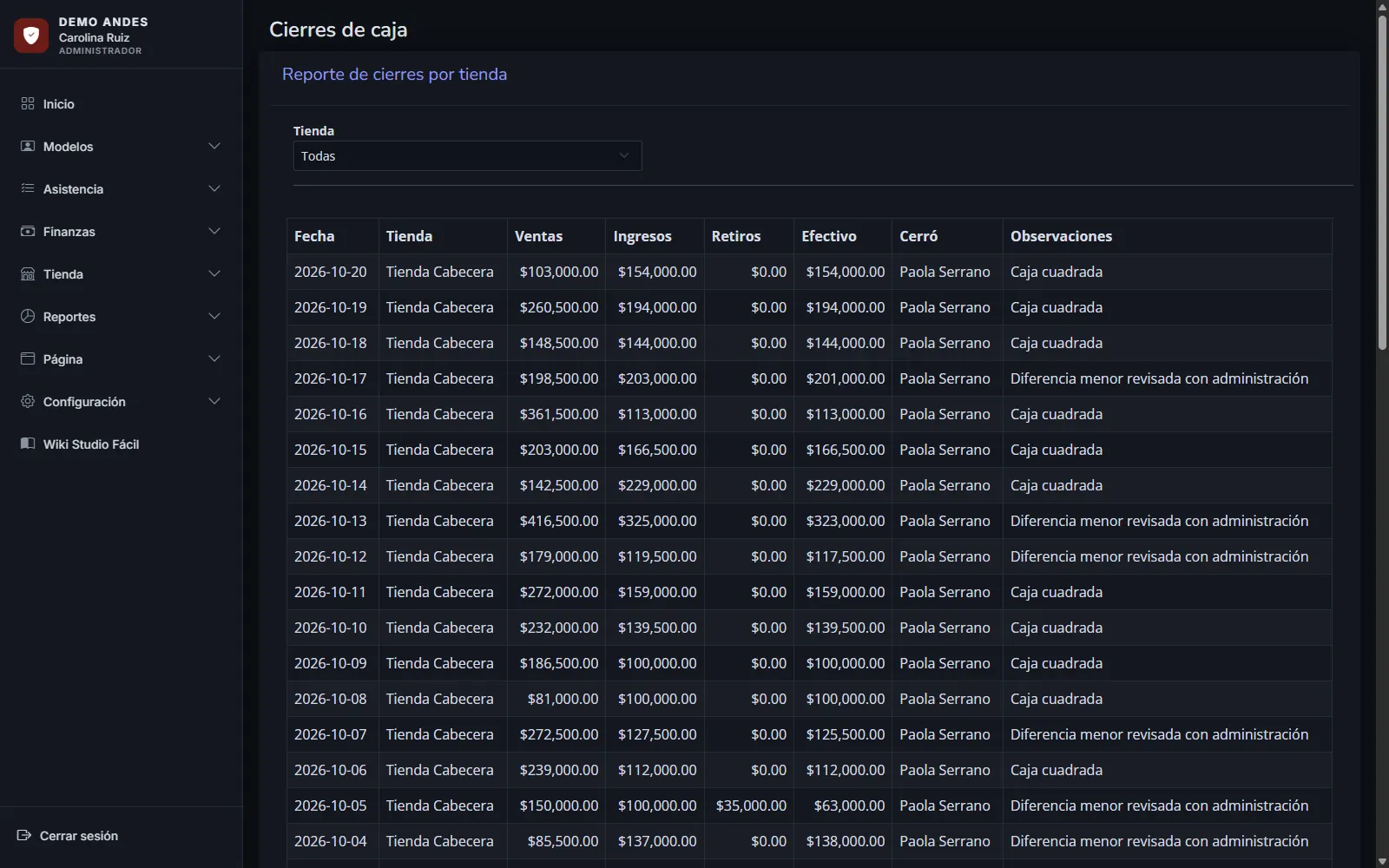
Daily cash closing report per store with sales, income, withdrawals, cash and closing notes
Step 5 of 7 · Cash closing

Every day, the cash register balanced

The closing report shows sales, income, withdrawals and cash per store for each day, who closed and any note.

  • Daily closing per storeWith a store filter when the studio has several.
  • Cash reconciliationSales, income, withdrawals and final cash for each day.
  • Owner and notesIt records who closed and any difference that was reviewed.

Each day’s cash is reconciled before the fortnight is closed.

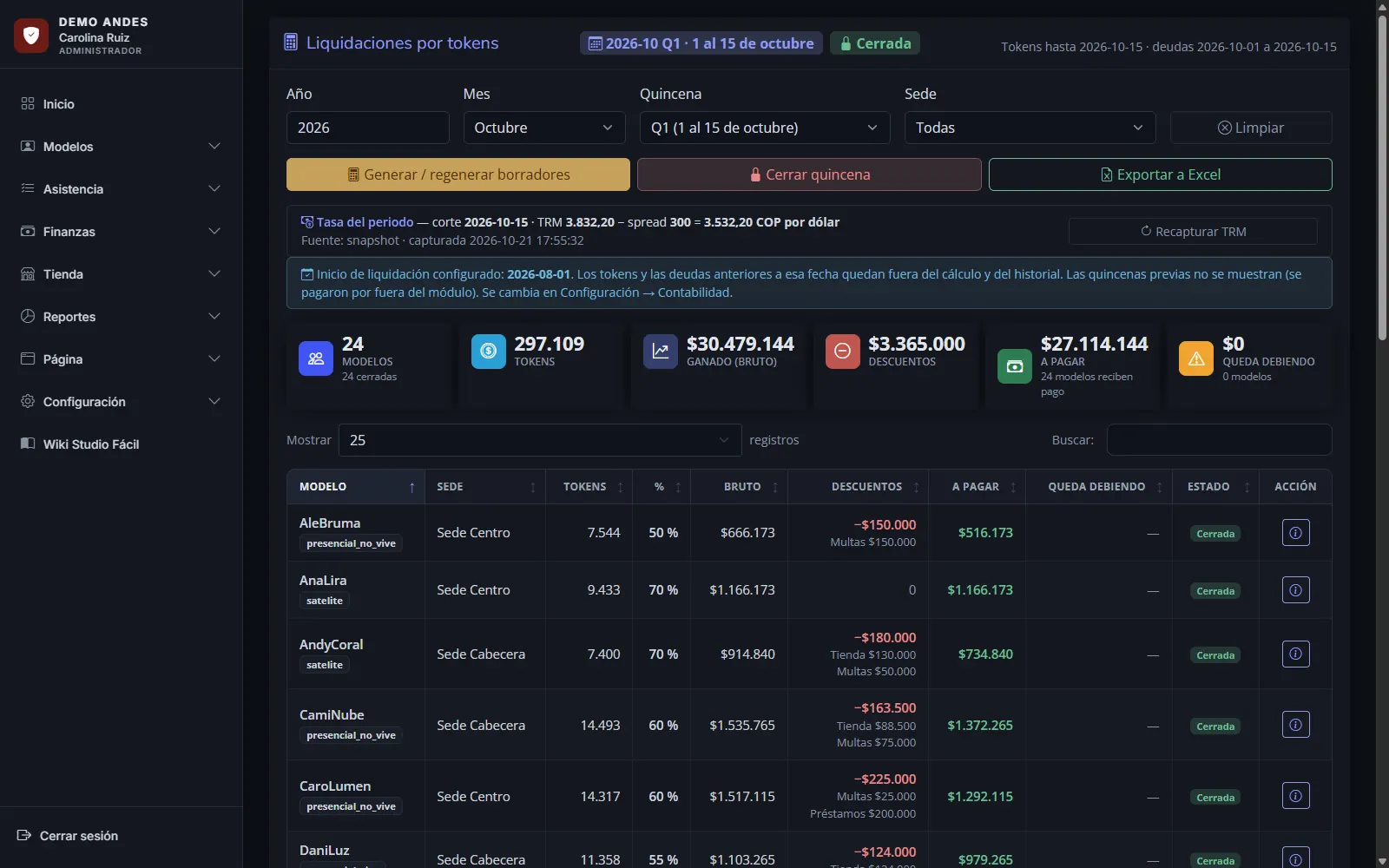
Fortnightly token payroll with the period exchange rate, percentage per model, store, fine and loan deductions and net pay
Step 6 of 7 · Payroll

The fortnight settled, without spreadsheets

Payroll takes each model’s tokens, the exchange rate at the cut-off and her percentage, and deducts store purchases, fines and loans down to the net pay.

  • Period exchange rateRate frozen at the cut-off, with the spread the studio sets.
  • Drafts and closingGenerate drafts, review, close the fortnight and export it to Excel.
  • Deductions in the net payStore, fines and loans are deducted automatically and what each model still owes is clear.

Once the fortnight is closed, the studio totals show up on the dashboard.

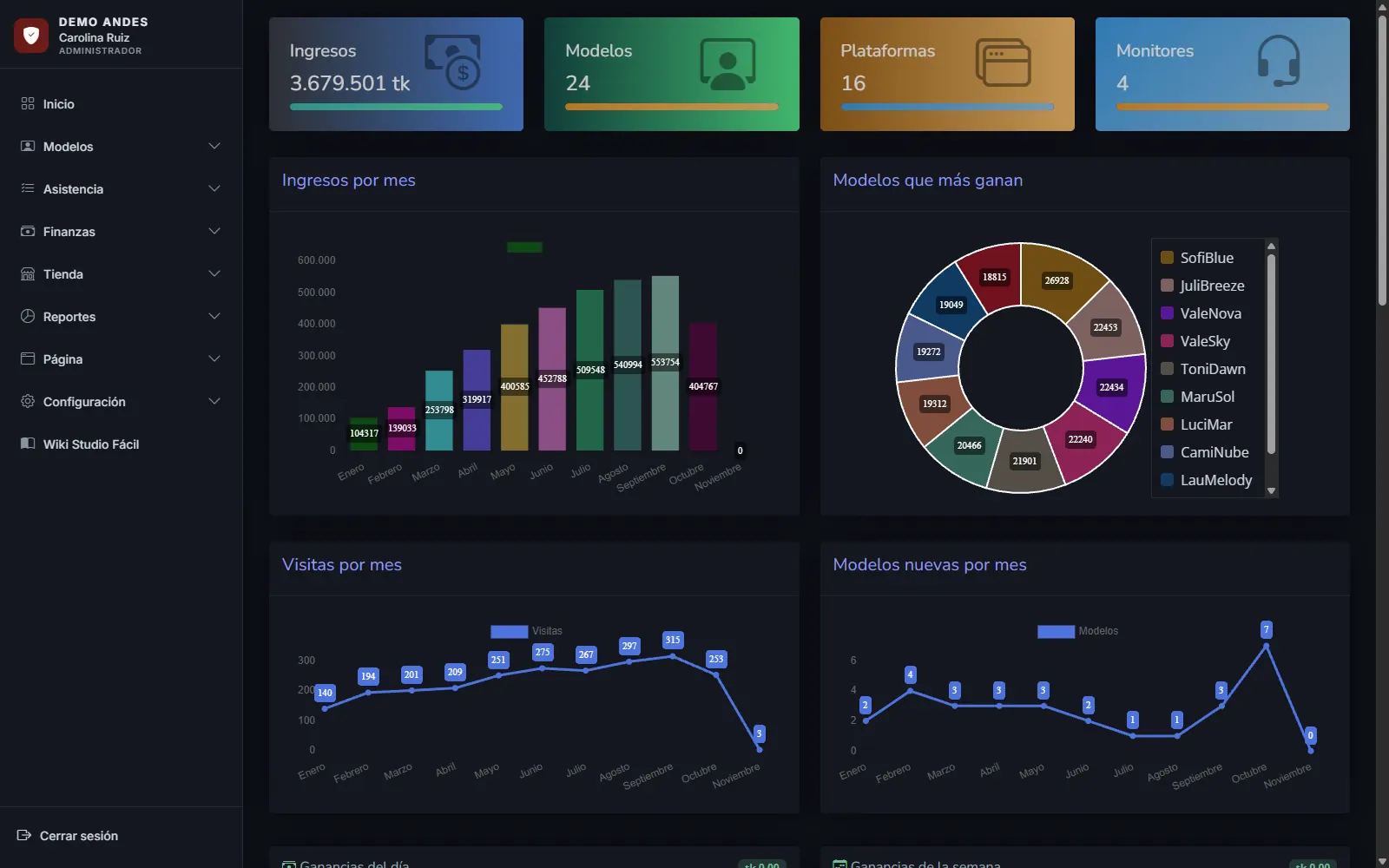
Studio Fácil home dashboard with token income, active models, platforms, monitors and charts of monthly income and model ranking
Step 7 of 7 · Dashboard

The studio at a glance

When you log in you see token income, active models, platforms and monitors, with the charts for the year.

  • Studio indicatorsIncome, models, platforms and monitors on the first screen.
  • Income by monthJanuary to December, to compare seasons.
  • Top-earning modelsThe ranking by tokens, plus visits and new models per month.

It closes the loop: income, models and platforms to plan the next fortnight.

Real screenshots of the platform (in Spanish) with sample data. See all features

Simulator

What a fortnightly payout looks like

Type sample values and see the resulting receipt. In Studio Fácil this calculation comes from each model's recorded earnings, with their deductions and advances.

$

What the model produced across all platforms, in Colombian pesos.

60 %

Each studio sets its own agreement.

$

For example supplies or absences, per the studio's rules.

$
What the service includes

What you get with Studio Fácil

The system installed for your studio, with your information loaded and your team trained.

  • In the cloud

    No servers or installations: you log in from the browser.

  • Your own installation

    With your domain, your database and your logo.

  • Training

    We teach you the full flow with a fortnight of your studio.

  • Support

    By WhatsApp and email, with a team that knows the system.

  • Onboarding help

    With setup and loading your models, depending on the plan.

  • Your data is yours

    Export payroll, payment reports, inventory and store sales to Excel.

Three plans, Essential, Professional and Business; the quote depends on your studio.

Common questions

Frequently asked questions

Who is Studio Fácil for?
For people who run a webcam studio and need to organize operations: models, schedules, revenue and payments in one system instead of separate tools.
What can I control with the platform?
Model records and status, shifts and hours worked with attendance, revenue by model, platform and period, and payment settlements with commissions, deductions, advances and receipts.
How are model payments settled?
The payments module automates settlement and manages commissions, deductions and advances, and generates payment receipts, reducing manual work.
Is the studio's information protected?
Yes. It uses role-based access with distinct permissions, data encryption and activity logging, and runs in the cloud with automatic backups.
Can I request custom features for my studio?
Kondory also offers custom software development if your operation needs something specific. To see Studio Fácil in action you can request a demo.
Get to know the system

Book a demonstration

Choose a time that works for you. We will review your operation and answer your questions about the system.

Choose a date and time Open the calendar in a new tab